
For many SMEs in Singapore, duplicate content is not the real problem.
They have a URL control problem.
That distinction matters, because the fix is different. Google usually does not panic because two pages use similar words. It gets confused when your site gives it three versions of the same page, five tracked URLs, two protocol variants, and a handful of internal links pointing at the wrong one. Then the wrong page ranks, the right page gets ignored, and your reporting starts to look mildly cursed.
Canonical tags are how you clean that up.
If you have ever wondered why Google indexed a URL with tracking parameters, why an old HTTP page still appears in search, or why two service pages seem to compete with each other, this is the issue to check first.
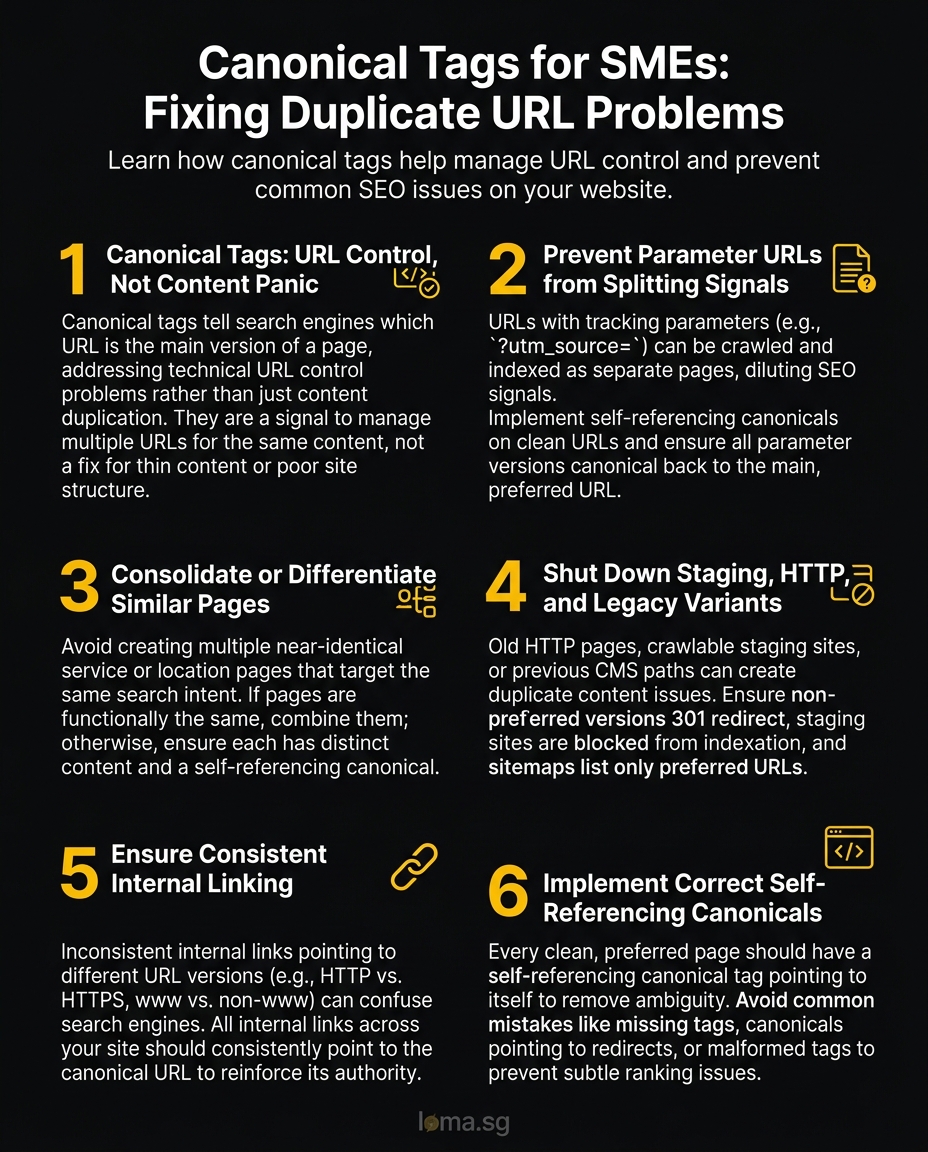
Canonical tags are not a duplicate content panic button
A canonical tag tells search engines which URL should be treated as the main version of a page.
That is it. It does not magically merge weak pages into strong ones. It does not fix thin content. It does not rescue a bad site structure. It is a signal that says, “these URLs are similar, this is the one that matters.”
The reason this gets misunderstood is simple. “Duplicate content” sounds like a content writing issue, so people start editing paragraphs. In practice, most canonical problems on SME websites come from technical mess rather than copy.
Common causes include:
- URLs with UTM parameters getting crawled and indexed
http://andhttps://versions both existing in some formwwwand non-wwwversions behaving inconsistently- near-identical service or location pages targeting the same intent
- CMS-generated tag, filter, or pagination URLs with no clear indexation rules
- internal links pointing to different URL versions of the same page
That is why canonical tags sit inside technical SEO, not content cleanup.
If your site has multiple URLs for the same page, you need to tell search engines which one wins. If you do not, Google makes the choice for you, and you may not like its taste.
The five canonical mistakes that keep showing up on SME websites
1. Parameter URLs are being treated like separate pages
This is the most common problem by far.
You publish a normal page at /services/seo. Then your campaign links create versions like /services/seo?utm_source=linkedin or /services/seo?ref=mailshot. Humans know these are the same page. Crawlers still need a clear signal.
If those parameter URLs can be crawled, shared, or linked internally, they may show up as separate discovered pages. That splits signals, creates reporting noise, and sometimes causes Google to surface the uglier URL instead of the clean one.
The fix is straightforward:
- use a self-referencing canonical on the clean URL
- make sure parameter versions canonical back to the clean URL
- avoid linking internally to tracked URLs
- keep campaign tracking for marketing, not for permanent site navigation
Canonical tags work well here because the page content is usually identical. This is the kind of problem they were born for.
2. Duplicate service or location pages target the same thing
Many SME sites create multiple pages that are functionally the same with light wording changes.
Examples:
/seo-services/seo-agency/seo-consultant
Or worse:
/web-design-singapore/web-development-singapore/website-design-company-singapore
If those pages all try to rank for the same commercial intent, a canonical tag is not always the full answer. Sometimes you need consolidation, not annotation.
Here is the rule of thumb: if the pages should really be one page, combine them. If they must stay separate for a real business reason, each page needs a distinct purpose, distinct copy, and a canonical pointing to itself.
Using canonical tags to excuse lazy page duplication is not strategy. It is hiding clutter under the rug.
3. Staging, HTTP, or legacy variants were never properly shut down
This one is less common than parameter URLs, but more damaging when it appears.
A site redesign launches. The new HTTPS version is live. Yet old HTTP pages still resolve. Or a staging subdomain was crawlable. Or a previous CMS left duplicate paths behind. Now Google sees several versions of the same content and starts indexing whichever one it found first or trusts most.
Canonical tags help, but only if the rest of the setup is sane.
You should also check:
- whether non-preferred versions 301 redirect correctly
- whether staging sites are blocked from indexation
- whether sitemaps list only preferred URLs
- whether canonical tags on old pages point to the live version
If your redirects, canonicals, and sitemap disagree, search engines get mixed instructions. Mixed instructions usually produce mixed results.
4. Internal linking points to inconsistent URL versions
A lot of websites accidentally sabotage their own canonical setup.
The canonical tag may point to https://example.com/service-page, but the navigation links to http://www.example.com/service-page/, a footer link uses a parameterised version, and a blog article links to a different slug variation entirely.
This creates a trust problem.
Search engines do not look at canonical tags in isolation. They compare them with other signals, especially internal linking. If your site keeps telling Google three different URLs matter, the canonical tag becomes more like a suggestion than a directive.
That is why a canonical audit should always include internal links. Check menus, footer links, related posts, breadcrumbs, XML sitemaps, and older blog content. Consistency matters more than most teams realise.
If you want the canonical URL to win, behave like you mean it everywhere on the site.
5. Self-referencing canonicals are missing, broken, or contradictory
A clean page should usually have a self-referencing canonical.
That means the page points to itself as the preferred version. This removes ambiguity and helps reinforce URL consistency. It is a small implementation detail, but it prevents a surprising number of problems.
Common mistakes include:
- no canonical tag at all
- canonical pointing to a redirecting URL
- canonical pointing to a non-indexable page
- canonical pointing to page one from every paginated page without a valid reason
- canonical chains, where page A points to B and B points to C
- relative URLs or malformed tags generated by the CMS
When canonical tags break, they rarely fail loudly. They just create subtle ranking weirdness that wastes weeks.
A practical canonical audit checklist you can run without technical theatre
You do not need enterprise tools and a 70-slide deck to spot canonical problems. You need a short checklist and the discipline to compare signals properly.
1. Check which URL Google actually indexed
Start with the pages that matter most, your service pages, high-intent blog posts, and revenue-driving landing pages.
Use URL Inspection in Google Search Console and ask:
- is this URL indexed
- what URL does Google consider canonical
- does that match the canonical you declared
If Google-selected canonical and user-declared canonical do not match, something is off. That usually means other signals are overriding your tag.
2. Crawl the site and export canonical data
Use a crawler like Screaming Frog or Sitebulb and review:
- pages missing canonical tags
- canonical tags pointing to redirects
- non-indexable canonical targets
- duplicate pages with inconsistent canonical targets
- pages with multiple canonical tags in the source
This is where patterns become obvious. One or two bad URLs are normal. Entire templates failing the same way means you have a system issue.
3. Inspect the page source, not just the rendered page
CMS plugins and SEO tools can make everything look fine in the browser while outputting nonsense in the source.
Open the actual HTML and confirm the canonical tag:
- exists once
- uses the preferred absolute URL
- matches the final live URL format
- is not altered by scripts after load
If your canonical implementation depends on JavaScript to fix a server-side problem, I am already worried.
4. Compare canonicals with redirects, sitemap entries, and internal links
This is where most audits become useful.
For your important URLs, the preferred version should line up across four places:
- canonical tag
- internal links
- XML sitemap
- redirect behaviour
When all four agree, Google has very little room to misunderstand your intentions.
When they disagree, your site sends conflicting signals, and search engines respond by making judgment calls you did not ask for.
5. Review thin page variants that should probably not exist
Some canonical issues are really information architecture issues.
If you have six near-identical pages built to chase slight keyword variations, ask the harder question: should these pages exist at all?
Canonical tags are useful, but they are not a substitute for editorial discipline. In many cases, the best fix is to merge the duplicates, strengthen one page, and redirect the rest.
That usually improves rankings more than keeping a pile of half-distinct pages alive.
When to fix canonical issues in-house, and when to get help
You can usually handle this internally if:
- your site is small
- the issue is limited to parameter URLs or a few tag mistakes
- you can access the CMS templates or SEO settings
- your redirects, sitemap, and internal links are otherwise clean
Bring in outside help when:
- Google keeps choosing the wrong canonical despite your tag
- important pages are competing with each other
- staging or legacy URL issues are spread across templates
- your CMS outputs inconsistent canonicals at scale
- no one on the team can confidently trace the problem across source code, crawl data, and Search Console
This is the part many businesses delay for too long. Canonical issues do not always tank your site overnight. They just erode clarity. Rankings wobble, crawl budget gets wasted, the wrong URL earns links, and reporting becomes harder to trust.
That slow damage is exactly why it gets ignored.
Canonical tags work best when the rest of the site is disciplined
Canonical tags are not glamorous, but they are one of the clearest examples of how small technical inconsistencies create bigger SEO problems later.
If your site has multiple URLs for the same page, fix the source of the duplication where you can. Then use canonical tags to reinforce the preferred version, not to cover up structural mess.
That is the practical approach. Clean URL logic first, canonical signals second, no technical theatre required.
If your team wants help untangling duplicate URL issues, cleaning up indexation signals, or tightening the technical side of your SEO, talk to LOMA about technical SEO and digital marketing. You can also explore how this connects with broader AISEO and GEO work or learn more about how LOMA approaches growth.