Your Google Business Profile is probably your most underused marketing asset.
Not your website. Not your social media. The free profile Google gives every business: the one that shows up when someone searches your brand name, your category, or "near me" on Maps.
Most Singapore SMEs set it up once, maybe added some photos, and forgot about it. That's a missed opportunity, because GBP drives real commercial action: calls, directions clicks, website visits, reservation bookings. All from people who were already looking for what you sell.
This post covers what actually moves the needle in GBP rankings, the full optimization checklist, and the common mistakes that keep businesses buried on page two of local search.
Why GBP Is Your Highest-ROI Local Marketing Asset
Before getting into tactics, the basics: Google Business Profile (formerly Google My Business) is the panel that appears when someone searches for a business by name, or browses a category in Google Maps. The "local pack" (the 3 listings that appear above organic results for local searches) is driven almost entirely by GBP data, not your website.
That means for any search with local intent ("dentist near me", "Korean BBQ Orchard", "accounting firm Singapore"), Google is ranking GBP listings, not web pages.
The ROI case is straightforward. A fully optimized GBP costs nothing beyond time, and businesses in the top 3 local pack positions consistently outperform paid ads on call volume for local searches. If your business has a physical location or serves a geographic area, GBP is non-negotiable.
How Google Ranks GBP Listings
Google uses three factors to determine which GBPs rank in local search:
Relevance: Does your profile match what the searcher is looking for? This is influenced by your business categories, services listed, description text, and how you respond to reviews. If you haven't filled in your services and attributes, you're invisible for searches beyond your exact business name.
Distance: How close is the business to the searcher (or to the location in the search query)? This one you can't control directly, but it's why businesses with correct location data and service area settings outperform those with incomplete setup.
Prominence: How well-known and trusted is the business? This is where your review count, average rating, website authority, and engagement signals (calls, clicks, photos views) come in.
Most businesses focus on distance (they can't change it) and ignore relevance and prominence (which they can). That's backward.
The GBP Optimization Checklist: 10 Things to Fix This Week
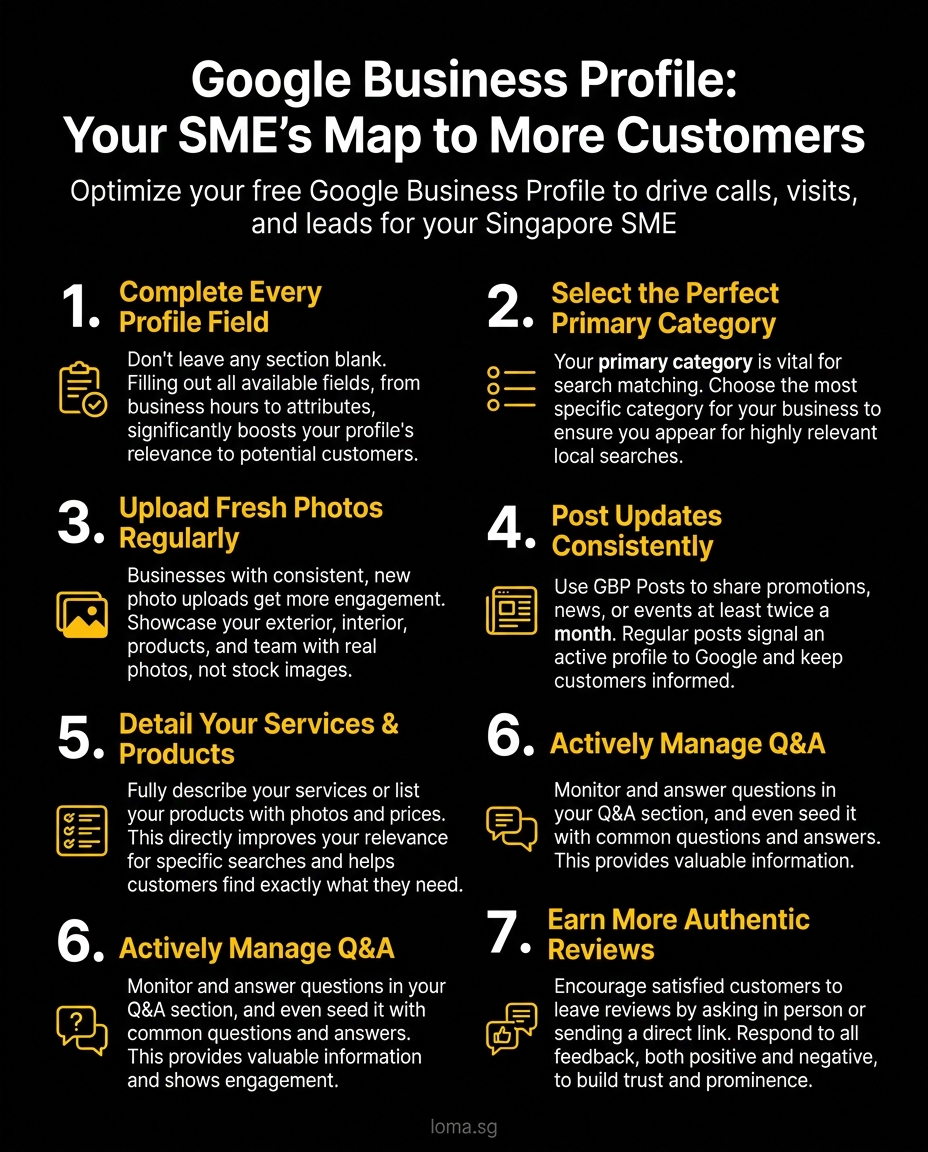
1. Complete Every Field: No Exceptions
GBP has a lot of fields. Most businesses skip half of them. This is a relevance signal you're leaving on the table.
Fill in:
- Business name (exactly as your business is registered; no keyword stuffing, Google will flag it)
- Primary and secondary categories
- Business description (750 characters max; use the first 250 wisely, that's what shows without expanding)
- Website URL
- Phone number (local number, not a mobile)
- Business hours (including public holidays)
- Attributes (women-led, wheelchair accessible, free Wi-Fi, etc., whatever applies)
- Service areas if you're a service-area business
The businesses that fill in every available field outperform those that don't. It's not magic, it's completeness.
2. Choose the Right Primary Category
Your primary category is the single most important relevance signal in your GBP. Get this wrong and you're not ranking for searches you should be winning.
Google has thousands of categories. Don't pick a generic one when a specific one exists. If you're a physiotherapy clinic, don't pick "Health". Pick "Physical Therapist". If you run a Japanese ramen restaurant, "Ramen Restaurant" beats "Restaurant" for relevant searches.
You can have up to 10 secondary categories. Use them for complementary services, not for keyword stuffing.
3. Upload Photos Consistently
Businesses with 10 or more photos get significantly more clicks and direction requests than those with fewer. That's not a guess. Google's own data has shown this.
More importantly: photo freshness matters. A profile with 50 photos all uploaded 3 years ago is weaker than a profile that's had new photos added each month.
What to upload:
- Exterior photos (so people recognize the place)
- Interior photos (ambiance, seating, setup)
- Team or product photos
- Work in progress or completed projects (for service businesses)
- Menu or service photos
Use actual photos, not stock images. Google can detect stock images, and customers definitely can.
4. Post Updates Regularly
GBP Posts are a feature most businesses ignore. They appear on your profile and in some search results, and they signal to Google that your profile is active.
Post at least twice a month. What to post:
- Promotions or offers (these have a specific Post type with a CTA button)
- New products or services
- Events
- Business news or updates
- Helpful tips relevant to your audience
Posts expire after 7 days (except Event posts), so regular cadence matters. If you use any social media scheduling tool, add GBP Posts to your workflow.
5. Build Out Your Services and Products
The Services section is one of the most underused parts of GBP. It lets you list each service you offer with a description and price (optional). This directly improves relevance matching.
If someone searches "roof repair contractor Singapore", a GBP that lists "Roof Repair" as a service with a description will outperform one that just says "General Contractor".
For product-based businesses, the Products section works similarly. Add photos, prices, and descriptions. These can appear directly on Maps searches.
6. Manage the Q&A Section
The Questions and Answers section on your GBP is public and anyone can post a question, or answer one. Including people who've never interacted with your business.
Check your Q&A section. Answer questions you haven't answered. Flag or report inaccurate answers that others have posted.
Better yet: seed the section yourself. You can post questions from your own account and answer them. Address the most common things people ask before visiting or calling. This looks like a populated, active profile to both users and Google.
7. Get More Reviews (The Right Way)
Reviews are the most visible prominence signal. High review count plus high average rating is what puts you in the local pack.
How to get more reviews without violating Google's rules:
- Ask in person after a positive interaction. This is the most effective method by far.
- Send a follow-up email or WhatsApp with a direct link to your GBP review page (get the short URL from your GBP dashboard)
- Add a QR code to receipts, menus, or invoices that links directly to the review form
What not to do:
- Offer incentives for reviews (this violates Google's policy and can get reviews removed)
- Ask staff or friends to post reviews (fake reviews risk profile suspension)
- Use third-party services that post reviews in bulk
Respond to every review, positive and negative. For negative reviews, respond professionally and offer to resolve the issue offline. Your responses signal to Google that the business is engaged.
8. Use GBP Messaging
GBP has a messaging feature that lets customers send you a message directly from your profile. It's not the right channel for every business, but if you enable it, respond quickly.
Google tracks response time. If you take days to respond to messages, it will show your average response time publicly, and that affects whether customers bother messaging at all.
Only enable messaging if you can realistically respond within a few hours during business hours.
9. Keep Your Information Updated
Outdated information is one of the most common GBP mistakes. Wrong hours, old phone numbers, closed locations still showing as open: these erode trust and hurt rankings.
Set a calendar reminder to review your GBP information quarterly:
- Are hours correct (including current holiday schedules)?
- Is the website URL still working?
- Has the phone number or location changed?
- Are all photos still current?
Google also allows customers and third parties to suggest edits to your profile. Check your GBP regularly for edit suggestions and either accept or reject them. Don't let them sit pending.
10. Track Your GBP Insights
GBP has a built-in analytics section (Google calls it "Performance") that shows:
- How many times your profile appeared in search and maps
- What searches triggered your profile
- How many people called, clicked for directions, or visited your website
- Photo views vs. competitors
Look at what searches are triggering your profile. If you're showing up for relevant searches but not getting calls, the issue might be your photos, reviews, or website conversion. If you're not showing up for searches you should be winning, the issue is relevance: go back to your categories and services.
Reviews: The Trust Signal That Most Businesses Underinvest In
Average review score matters, but review count matters more than most businesses realize. A business with 4.3 stars and 200 reviews will consistently outperform a business with 4.9 stars and 12 reviews in both Google rankings and user click-through.
Volume signals longevity and consistent customer interaction. A handful of perfect reviews looks like a managed exercise. 150 mixed reviews with thoughtful responses looks like a real, operating business.
Build a systematic review collection process:
- Identify your highest-satisfaction touchpoints (post-delivery, post-service, post-event)
- Train whoever handles that touchpoint to verbally ask for the review
- Have a QR code or link ready to send immediately
- Follow up once via WhatsApp or email within 48 hours if you haven't received one
Don't ask everyone. Ask the customers who've had a clearly positive experience. Timing and targeting matter.
Common GBP Mistakes SMEs Make
Keyword stuffing the business name. "City Dental Clinic (Best Dentist Tanjong Pagar)" is a policy violation. Google will suppress your profile. Use your actual business name.
Ignoring the profile after setup. A dormant profile with no new photos, no posts, and unchanged information for 2 years is algorithmically weaker than an active one.
Not claiming the profile at all. Unclaimed GBP profiles still exist. Google creates them from data it scrapes. If you haven't verified ownership, you have no control over the information. Claim it.
Wrong business hours. Customers who show up during hours you listed as open, only to find you're closed, leave angry reviews. Google tracks "store confirmed closed" signals.
Treating all reviews the same. A 5-star review with no text is almost worthless. A detailed 4-star review describing a specific service is valuable. When asking for reviews, encourage people to describe their experience. It improves your relevance matching for specific searches.
What a Fully Optimized GBP Looks Like
When you've done everything on this list, your profile should have:
- Verified ownership and accurate information on every field
- A primary category that precisely matches your core service
- 20+ photos with monthly additions
- 2+ Posts per month
- Services and products fully populated
- 50+ reviews with consistent responses
- Active Q&A section
- GBP Insights reviewed monthly
This isn't a one-time project. It's a channel that rewards ongoing attention, the same way your social media does. The difference is that the ROI on GBP work is more direct: it puts you in front of people who are actively looking for what you sell.
Need Help With Local SEO?
GBP optimization is one part of a local SEO strategy. If your business relies on local search visibility, the profile is the foundation, but it works best alongside consistent NAP (name, address, phone) citations, local-intent content, and technical SEO on your website.
LOMA's digital marketing services include local SEO for Singapore SMEs: GBP setup and management, local citation building, and search visibility reporting that shows you what's actually driving calls and visits.
If you want to stop guessing and start seeing where your local search traffic is coming from, get in touch with us.