Your customers are already on WhatsApp. The problem is most SMEs still use it like a support inbox instead of a marketing channel.
That means one staff member replying manually, the same questions repeated all day, promotions sent ad hoc, and no real system behind it. It feels busy. It does not scale.
Done properly, WhatsApp marketing is not just "send messages to customers." It is a direct-response channel with absurdly high attention, faster feedback than email, and far less algorithm nonsense than social media. Used badly, it becomes spam with a green logo. Used well, it becomes one of the simplest ways to move people from interest to purchase.
The shift is straightforward: stop treating WhatsApp as a chat app you happen to use for business, and start treating it as infrastructure.
Why WhatsApp Is So Underused as a Marketing Channel
Most businesses already have the raw ingredients.
They have customers messaging to ask about pricing, booking slots, product availability, delivery timing, appointment changes, and payment details. They have staff replying from a phone. They have a contact list. They have recurring promos or reminders. They have zero system.
That is the missed opportunity.
Email still matters, but attention there is unreliable. Social media can help with discovery, but platform reach is rented. WhatsApp sits much closer to the point of decision. People open it constantly. They use it to coordinate family plans, sales conversations, group orders, clinic updates, property viewings, and post-purchase questions. That makes it unusually powerful for businesses that need quick responses and short conversion windows.
The issue is that many SMEs never move beyond reactive behaviour:
- Someone asks a question, you reply manually
- A promo goes out only when the owner remembers
- Leads are not segmented
- No one tracks which messages drove sales
- The same FAQs burn time every week
That setup works when the business is tiny. It becomes a drag the moment contact volume increases.
WhatsApp marketing starts when you stop asking, "Who is free to reply?" and start asking, "What should happen automatically once a customer enters this conversation?"
WhatsApp Business App vs. WhatsApp Business API
This is where a lot of confusion starts.
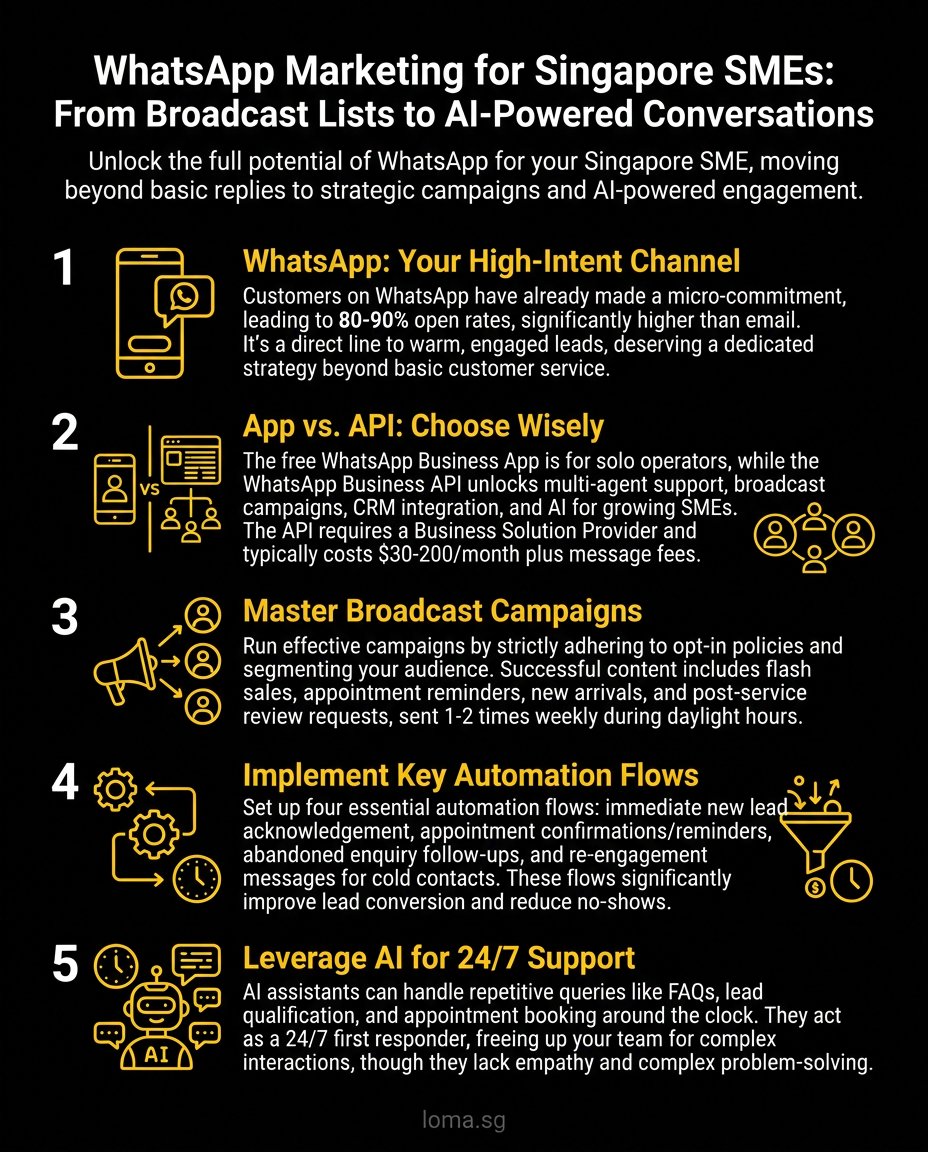
The free WhatsApp Business app is fine for very small operations. If you have low message volume, a limited contact base, and one person handling conversations, it can do the job. You can set a basic profile, quick replies, catalog items, labels, and greeting messages. For some businesses, that is enough for now.
But it breaks down once WhatsApp becomes operationally important.
You should think about the WhatsApp Business API when:
- You are manually sending the same update to dozens of customers
- Multiple staff need to handle one shared inbox
- You want CRM integration
- You need automated qualification or routing
- You want structured follow-ups, reminders, or abandoned cart flows
- Customer conversations are now part of sales, not just support
A blunt rule: if you are copying and pasting the same message to 50 people, the free app is already too small for what you need.
Here is the practical difference.
What the free app is good for
- Low-volume enquiries
- One-person handling
- Basic catalog browsing
- Manual follow-ups
- Very early-stage businesses
What the API is for
- Automation at scale
- Shared team inboxes
- Broadcast workflows with proper structure
- Integration with CRM, eCommerce, booking, or support systems
- AI assistants that can actually do useful work
The API is not automatically the better option for every business. It is the better option for businesses that already have enough message volume to justify process.
That distinction matters, because plenty of SMEs think they need a "WhatsApp chatbot" when what they really need is a better message flow. Others think the API is too advanced, when in reality they crossed the line for needing it months ago.
Four WhatsApp Marketing Strategies That Actually Work
The strongest WhatsApp strategies are not clever. They are timely, specific, and useful.
1. Broadcast campaigns that sound like a human wrote them
A bad broadcast reads like a discount flyer shoved into a private chat.
A good one feels relevant and expected.
Bad example:
Big sale now on!!! Buy today!!! Limited time only!!! Click here!!!
Better example:
We just launched our Raya dessert box for pre-order. If you want one for this weekend, reply with "Raya" and we'll send the menu and delivery slots.
See the difference? One is spam. One creates a clear next step.
Broadcasts work best for:
- New product launches
- Limited seasonal offers
- Event invites
- Restocks
- Appointment slot openings
- Short, high-intent campaigns
If you are in retail, F&B, clinics, education, or services with recurring customer contact, broadcasts can drive action fast. But only if the list is opt-in and the message feels like it belongs in WhatsApp.
2. Automated welcome and qualification flows
The first reply matters because speed changes conversion.
If someone messages your business and hears nothing for two hours, the conversation is already colder. A welcome flow fixes that. It gives the customer immediate confirmation, sets expectations, and routes them to the right next step.
A basic qualification flow can ask:
- Are you enquiring about product, booking, pricing, or support?
- Which location or service do you need?
- Are you an existing customer or new lead?
That alone cuts manual back-and-forth dramatically.
For service businesses, this can pre-qualify leads before a staff member steps in. For clinics, it can route appointment queries differently from medication or administrative questions. For eCommerce, it can separate product questions from order status.
The point is not to create a robotic maze. The point is to remove pointless repetition.
3. Abandoned cart and follow-up sequences
For eCommerce, this is where WhatsApp gets financially interesting.
Email abandoned cart flows are standard. WhatsApp follow-up is often more immediate and harder to ignore. If a customer was close enough to cart an item, a well-timed message can recover revenue that would otherwise disappear.
This only works if the message adds context.
Not this:
You forgot something in your cart. Buy now.
More like this:
You were looking at our ceramic pour-over set earlier. If you want it delivered before Friday, we still have stock. Reply if you want the link again.
That sounds more human, more contextual, and less desperate.
Follow-up sequences also work for:
- Quote reminders
- Incomplete bookings
- Event registrations
- High-consideration product enquiries
The key is restraint. WhatsApp is intimate. One timely nudge can work. Three generic nudges will get you muted.
4. Post-purchase flows that increase repeat revenue
A sale should not be the end of the conversation.
Post-purchase WhatsApp sequences can handle:
- Order confirmation
- Delivery updates
- Setup instructions
- Review requests
- Reorder reminders
- Upsell or cross-sell suggestions
This is especially useful where timing matters.
For example:
- A skincare brand can follow up 21 days after purchase with replenishment logic
- A clinic can send appointment reminders and care instructions
- A food business can ask for pre-orders before a known buying window
- A service business can request feedback while the experience is still fresh
That turns WhatsApp from support overhead into retention infrastructure.
What Ruins WhatsApp Marketing Fast
WhatsApp can perform extremely well, but it punishes lazy marketers.
Here is what breaks trust quickly:
Buying or importing cold contact lists
If people did not clearly opt in, do not message them. This is not just a compliance issue. It is a good way to damage your brand and get flagged.
Treating broadcasts like email blasts
WhatsApp messages should be shorter, sharper, and more contextual. If your message sounds like it was copied from an EDM, rewrite it.
Sending messages with no reason
Frequency without relevance feels invasive. Customers tolerate WhatsApp outreach when it is useful, timely, or expected. They do not tolerate random brand noise.
No opt-out path
Customers should know how to stop messages. If they cannot, your process is sloppy.
Fake personalisation
Using a first name is not strategy. Real personalisation reflects behaviour, purchase history, location, or stated interest.
A good test: if you received your own campaign message from another brand, would you find it useful or annoying? Most bad WhatsApp marketing fails that test instantly.
Where AI Makes WhatsApp Actually Interesting
This is the part many businesses skip straight to, often too early.
An AI assistant is not useful because it sounds futuristic. It is useful when it can reduce response time, improve handling quality, and connect to real business context.
That means it should be able to do things like:
- Answer product questions based on live catalog data
- Check stock or availability
- Route leads by intent
- Handle common FAQs without scripts breaking every third conversation
- Support bookings, order status, or basic qualification
The difference between an old-school chatbot and an actual AI assistant is flexibility.
A rules-based chatbot waits for exact keywords and falls apart the moment the customer writes like a normal person. An AI assistant can interpret intent, keep context across turns, and respond more naturally. That is a meaningful improvement, but only when connected to real workflows.
This is where AI assistants stop being a novelty and start being operationally useful.
For businesses with heavy customer conversation volume, AI on WhatsApp is often most valuable in the first 60 seconds of a chat. It can welcome, classify, answer common questions, and hand off only when needed. That gives your team more time for sales, service recovery, and exceptions.
The Minimum Viable WhatsApp Strategy for SMEs
Most businesses do not need a giant rollout. They need one sensible system that works.
Start here:
1. Audit what is already happening
How many customer conversations happen on WhatsApp each week? What are the common message types? How many are repetitive? What is the average response delay?
If you do not know, you are managing by feel.
2. Decide whether you need the app or the API
If your team is still small and message volume is modest, stay on the app for now. If conversations are already operationally important, move up.
3. Build one opt-in list properly
Do not treat your existing contact database like a free-for-all. Build legitimate consent into forms, purchases, bookings, or enquiry flows.
4. Launch one automation first
Pick the highest-friction use case. Usually that is:
- Welcome + lead routing
- Post-purchase updates
- Appointment reminders
- One broadcast workflow
Do not start with six flows. That is how teams build complexity they never maintain.
5. Measure business outcomes
Track reply rate, conversion from conversations, opt-out rate, repeat purchase behaviour, and staff time saved. If your reporting still ends at "messages sent," you are missing the point.
What LOMA Recommends
Most SMEs do not need "more channels." They need better use of the channels customers already prefer.
WhatsApp is one of the clearest examples. It sits close to intent, close to purchase, and close to service. That makes it ideal for automation, segmentation, and intelligent handoff.
The smart path is usually not to automate everything. It is to automate the repeatable 30 percent that steals time every day, then improve from there.
That is also why WhatsApp should not be isolated from the rest of your marketing. It should connect to your site, your CRM, your post-purchase flows, and your broader digital marketing strategy. If it does not connect to anything, it stays a chat tool. If it does, it becomes a revenue channel.
If you want to turn WhatsApp from manual replies into a proper system, LOMA builds AI assistants that can support qualification, customer service, and conversion without making the experience feel robotic.
If that is where your business is headed, see how our AI Assistant service works, or contact us through LOMA for a practical discussion about whether the app, the API, or a full AI-assisted workflow makes sense for you.